PASSWORD! A set of characters that everybody treats as a secret and a private entity. A magical word that verifies your identity. A phrase that grants you access to the otherwise denied areas. A lock combination that unlocks safe to precious gems. A security layer to protect sensitive areas, objects, information, portals, people and what not. A risk you carry on your tongue and and save in your head. A world that denies the principle of “Keep It Simple, Stupid!”. More complex a password is, more good it is and the vice versa. If leaked or communicated to the wrong person by any means, can cause destruction, reputational damage, life risk, theft, and whatever you can think of. In this article, we will discuss the importance of a PASSWORD and how hackers guess the password.
What is a password
The term PASSWORD is the combination of two words “PASS” and “WORD”. The literal meaning of PASS is to be allowed entry or to go through. As for WORD means a phrase. So literally, a password means “a phrase that lets you pass”. In ancient times, this term was used by armies to identify friend from foe and whether to grant or restrict access to the sensitive areas. In this era, even with the advancement of technology, the term remains same and serves the purpose of securing digital identity.
Habit (Good/Bad)

Password is like a habit that can either be good or bad. If good, it can be an armor to strengthen your guard. Otherwise, it could just be a weight on your body making yourself weaker. Since the password serves as a means of digital identity, it is crucial to make it complex enough so that the malicious users cannot guess it easily.
Why guess the password?
Guessing a password means having the ability to impersonate anyone in the specific digital realm. This means having the authority and access to the resources similar to that of the actual person. Despite the technological advancements, the human minds seek comfort and majority of the people choose the weak passwords. At the same time, hoping that they are secure enough and the world is good and ideal enough to not abuse the simplicity of the passwords.
With the increased digitalization in each field, it has become important to streamline the process of granting access to resources while ensuring the confidentiality and availability of the resources to the right person. Attackers tend to find novel techniques to find or guess the correct password against any account or digital identity. The aim behind finding a password is to gain access to someone’s account whether social, financial, gaming, educational, corporate, or other account.
How to guess a password?

People seek easiness and following that comfort, they choose the password that they can easily remember. The most common ideas behind a person creating their password are their
- Own name, date of birth like Bob1969
- Pet’s name, date of birth like tomMy2012
- Loved one’s name, date of birth like Alice2003
- Country name like Pakistan1947
- Company name like Microsoft123
- Sequence of words like qwerty
- Sequence of numbers like 12345678
Despite this, people tend to share most of this information openly on the basis of which they create their passwords. There have been multiple data breaches that disclose the passwords of the users and the most common passwords as per seclists are
- 111111
- 1234
- 12345678
- abc123
- iloveyou
- letmein
- monkey
- password
- qwerty
- tequiero
- test
Attackers like to solve puzzles and tend to create connection between people and their digital/personal life to create a list of passwords. The list contains all the permutations of the possible passwords. Suppose Bob was born in Amsterdam in 1992 and is working in Microsoft since 2012. With this much information, an attacker can create the following list
- BobA1992
- Amsterdam
- Amsterdam92
- Microsoft123
- Microsoft2012
This technique can be used to create a list of passwords and try each password until you hit success.
Additional Techniques Hackers Use Exploit Passwords
Hackers use a variety of techniques to guess and crack passwords, including extracting browser passwords and exploiting weak credentials to gain unauthorized access. Let’s check a few additional others below:
Leaked Credentials
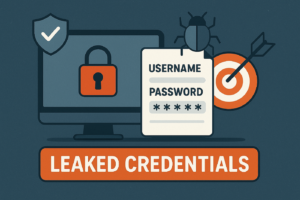
With the pace of trend shifting towards digital world and making everything online, the data breaches have also joined the pace. The frequency of data breaches has increased and a large part of the data breaches is the leaked credentials. Leaked credentials contain the username and the password at the minimum and some also contain the website URL for which data is leaked. Attackers buy the credentials either from dark web or via the subscription of famous sites including
All of these provide a set of credentials and some even provide the breach source. Attackers use these services to get the credentials and try out on the respective sites. Sometimes, the credentials do not work and there comes the creativity of the attacker. Suppose a breach contains the credentials tommy.golden:Italy2024 for the website TripAdvisor but upon trying the credentials, it says incorrect credentials. An attacker would then first search for tommy.golden profiles across social media and other online presence sites and assume attacker finds a public instagram profile. Upon checking, the highlights, attacker found that the victim is a travel influencer and visited Italy in the start of 2024. On the basis of this data, it can be said that the user changes the password in the start of each year and creates it as Country + Year. So checking through the profile, it was found that the victim visited Turkey in January of 2025. So following up the pattern, the password could be Turkey2025 and upon trying this password worked and attacker got control of the victim’s TripAdvisor account.
Password Reuse and Spraying
People hate remembering long complex passwords and that too different for each profile. And this mindset is the goldmine for the attackers where they need to find one password and BOOM!!! They will be getting access to all accounts belonging to that victim. This is because, most of the people use the same password everywhere without noticing that they are binding different locks with one single MASTER KEY. Attackers upon finding or guessing a password, try to check whether the same password has been reused for other services or not. They use a technique called Password Spraying where attackers use same password against different profiles or accounts to takeover other accounts by abusing password reuse.
Brute Force Attacks
Brute force attacks involve hackers using automated tools to systematically try every possible combination of characters until they find the correct password. This method can be very time-consuming, but it’s still effective on weak or short passwords. To counter this, it’s important to use long, complex passwords that contain a mix of letters, numbers, and symbols. The longer and more random the password, the harder it becomes for brute force tools to crack.
Dictionary Attacks
In a dictionary attack, hackers use a precompiled list of commonly used passwords or dictionary words to guess a password. Since many people use simple, predictable passwords like “password123”, “qwerty” or even “f00tbAll”, this attack method can be quite effective. To protect yourself, avoid using any dictionary words or common phrases in your passwords. Instead, create passwords that are random and don’t follow obvious patterns.
Credential Stuffing
Credential stuffing occurs when hackers use usernames and passwords leaked from previous data breaches to try and access multiple accounts. Since many people reuse the same credentials across different websites, this attack can be highly effective. The best way to defend against credential stuffing is to never reuse passwords. Using unique, strong passwords for each account greatly reduces the risk of this kind of attack.
Phishing Attacks are easier than password guessers
Phishing attacks for passwords are when cybercriminals deceive users into revealing their passwords by sending fake emails or creating fraudulent websites that look legitimate. These attacks prey on human error, often tricking people into clicking on links or entering personal information. To avoid falling for phishing attempts, always be cautious when clicking on links in emails. It’s also a good idea to enable two-factor authentication (2FA), which adds an extra layer of security.
Why Strong Passwords Are Crucial
Whether you’re an aspiring cybersecurity professional or a general tech user, understanding strong password best practices is critical. Weak passwords are like leaving the door of the vaults almost open for cybercriminals. This article dives into the importance of strong passwords, compares examples of strong vs. weak passwords, explains the utility of password managers, offers a tutorial on using Bitwarden, and discusses how hackers exploit weak passwords and ways to counteract these threats.
1. Protecting Sensitive Data
Passwords safeguard sensitive data, such as financial records, personal correspondence, and business-critical information. A compromised password can lead to data breaches, identity theft, and financial loss, often leaving victims scrambling to mitigate the damage.
2. Defense Against Brute Force Attacks
Hackers frequently use brute force techniques to crack passwords by systematically guessing combinations until they succeed. A strong password, with its complexity and length, significantly increases the time and effort required to crack it, often deterring attackers.
3. Safeguarding Organizational Integrity
For businesses, strong passwords are a cornerstone of cybersecurity policies. Weak credentials can lead to system breaches, compromising client data, intellectual property, and company reputation.
Many industries mandate robust password policies to comply with data protection laws like GDPR, HIPAA, or CCPA. Non-compliance can result in hefty fines and legal repercussions.
Strong vs. Weak Passwords
The strength of a password depends on its complexity, length, and randomness. Below are the few examples of strong and weak passwords
Weak Passwords
- 123456
- password
- qwerty
- john1989
These types of passwords are weak because they are short, predictable, and commonly used by many people. Their simplicity makes them easy targets for hackers, who can quickly crack them using brute force or dictionary attacks, where large lists of potential passwords are tested systematically.
Strong Passwords
- X9&h@Dk#7LwP$z
- !Ab5*qYr2$N%T4x
- C@rbon#F1ber!2024
These passwords are effective because they combine a mix of uppercase and lowercase letters, numbers, and special characters, making them harder to guess or crack. They are typically at least 12 to 16 characters long, providing an additional layer of security against brute force attacks. Furthermore, these are randomly generated and do not include personal information, which reduces the risk of someone deducing them based on knowledge of the user.
Best Practices for Creating Strong Passwords
Character Length
One of the best practices for creating strong passwords is focusing on character length. A password should be at least 13-16 characters long, as longer passwords are significantly harder for attackers to crack using brute force methods. Length adds complexity so more lengthy equals to more combinations to crack. Prioritizing length over simplicity strengthens overall security.
Use Combination
To create a strong password, it’s important to include a combination of letters, numbers, and symbols. This variety makes your password much harder to guess or crack, as it increases the number of possible combinations. Avoid obvious substitutions like “password123!” and aim for truly random mixes to enhance security e.g.
- g7#Lp9@xTq3!
- 8F$zvR2*Kj#1
- #4nWmX@7qP6$
Avoid Dictionary words
To keep your password secure, avoid using dictionary words or easily guessable patterns like “sunshine” or “123456.” Hackers often use tools that can quickly test common words and sequences, making these passwords vulnerable. Instead, opt for a random mix of characters that don’t form recognizable words or patterns. Do not even replace “football” with “f00tb4ll” because this is also now very common.
Use of Different Passwords
Never reuse passwords across multiple accounts. If one account gets compromised, all the others are at risk. It’s like using the same key for every door in your house. if someone steals it, they can get into everything. Instead, create unique passwords for each account or use a password manager to keep track of them securely. This way, even if one password is leaked, your other accounts stay safe.
The Role of Password Managers in Cybersecurity
Password managers are crucial for both individuals and organizations, helping to securely store and manage passwords. They make it easier to maintain strong, unique passwords across multiple accounts, offering enhanced security while reducing the risk of breaches. Some of the benefits are as follows:
- They automatically generate and store complex passwords, eliminating the need to remember them.
- Passwords are encrypted, providing robust protection against unauthorized access.
- Credentials are easily accessible from any device with synchronization, ensuring convenience on the go.
- IT teams can centrally manage and enforce password policies, ensuring consistency across all users.
- Role-based access controls restrict sensitive system access to authorized personnel only.
- Audit trails allow monitoring of login activity, helping to quickly identify and address potential security threats.
Tutorial: Using Bitwarden to Manage Passwords
Although there are many options available, let us see an example of how we can use Bitwarden as our password manager. You can access bitwarden using below url
A very good thing about bitwarden is that it can be used free of cost and its paid version is very economical.
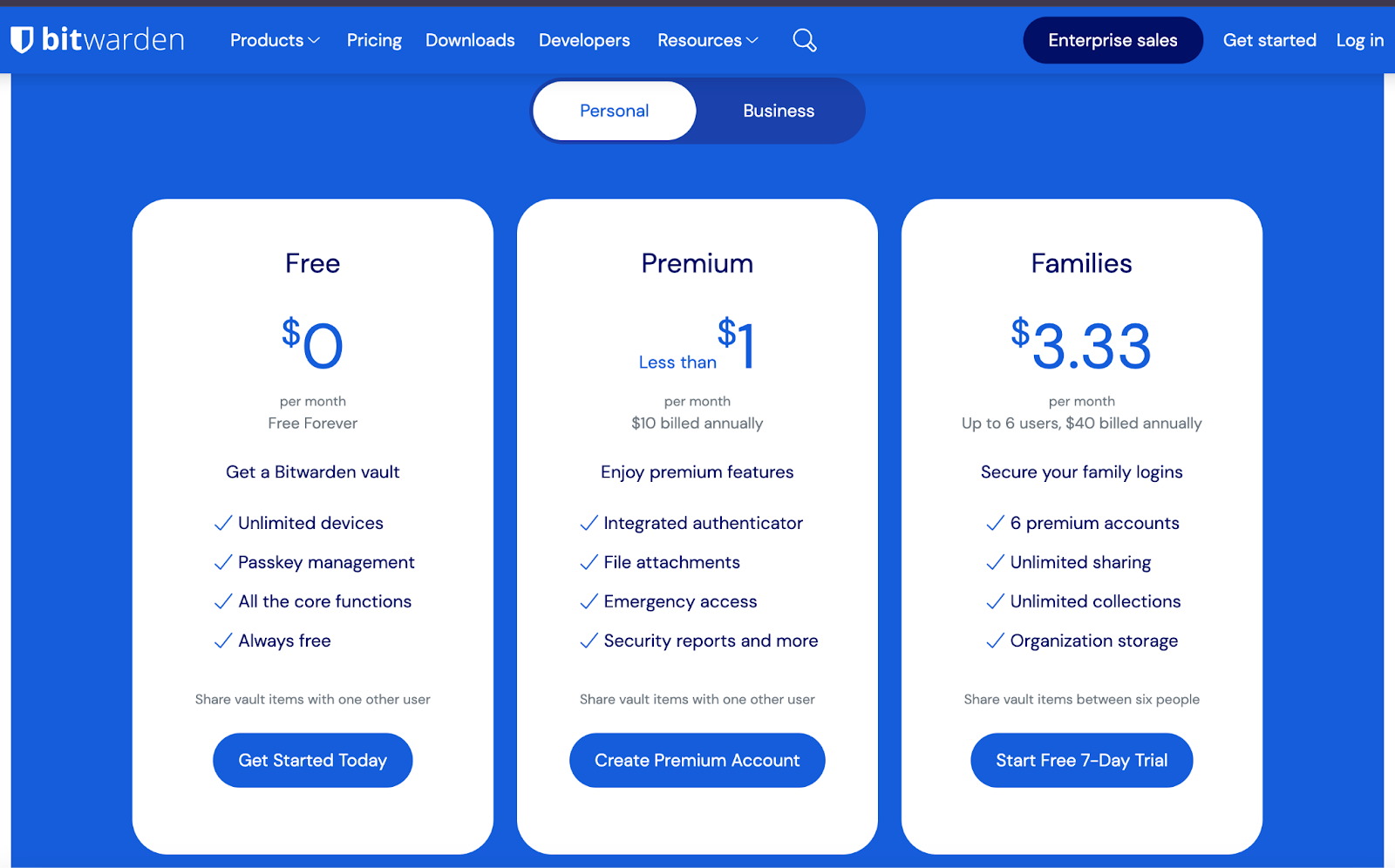
We can use bitwarden mainly with
- Web portal
- Browser extension
Let us skip the signup & login and go straight to setting passwords for our apps. But before that, make sure to set a complex master password for bitwarden and enable 2FA for bitwarden as this is what secures all of our other applications.
It is easier to use via browser extension so lets see an example of that. Install browser extension and log in. Now follow below steps
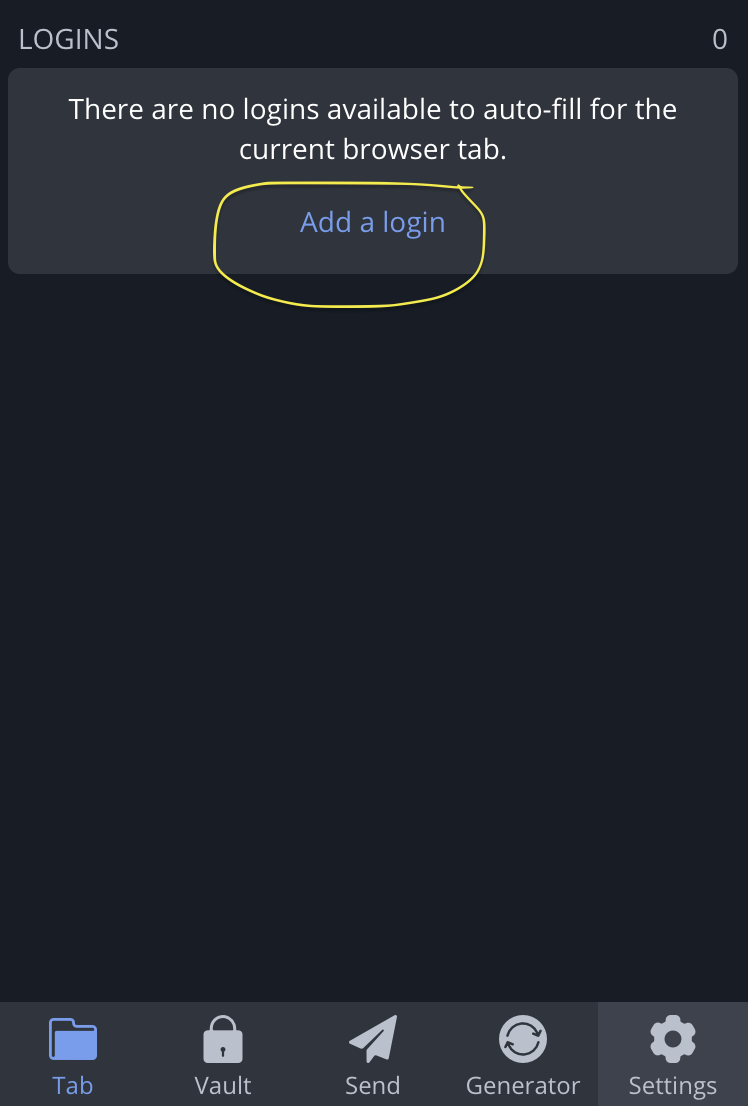
- Go to the website whose password you want to set and click on the extension mark of bitwarden. Click on add login.
- It will write the name of this login to remember e.g. my xx social app.
- Write username
- Write the login URL of the application e.g. https://myxxsocialapp.com/login. This is helpful as bitwarden identifies automatically which page needs the credentials.
- Now the important step is to generate the password. We can choose password vs passphrase, length, number of characters & digits, number of special characters, separators and much more. e.g.
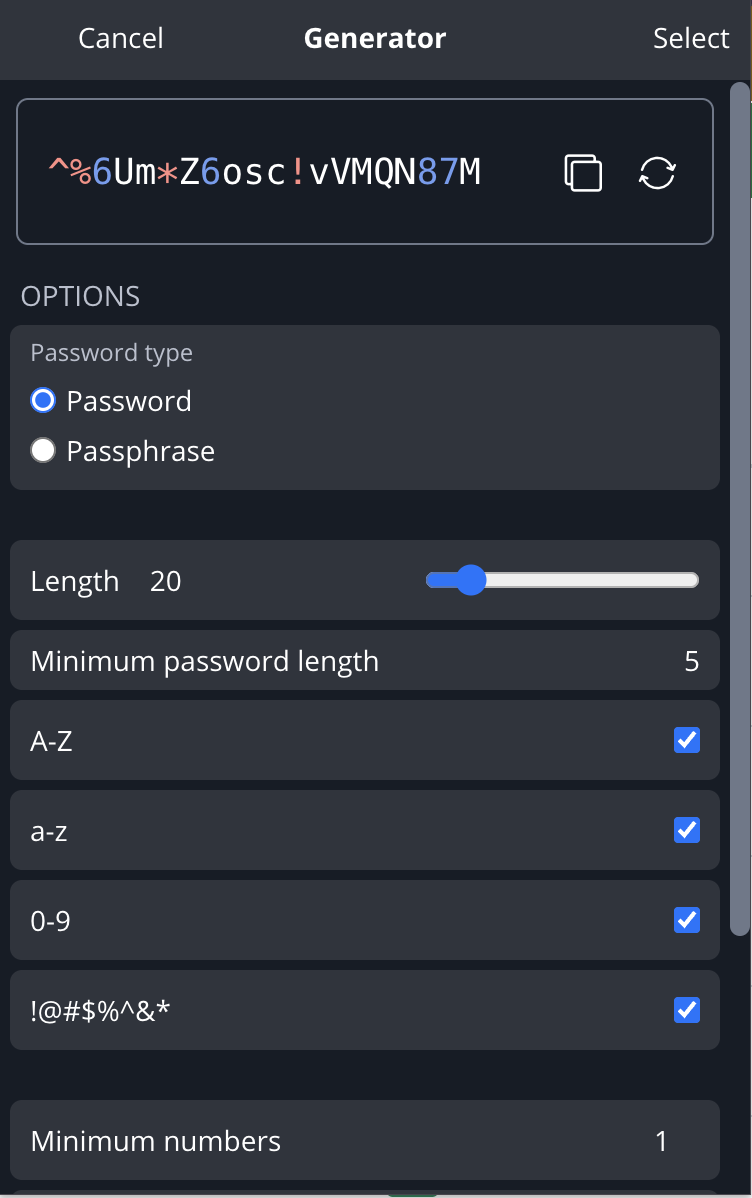
You can see the final password which is much more secure than the simple password like “f00tbAll”. This is how a password manager can secure our passwords. It will save this password and we can access it anywhere on any system.
Conclusion
You are as secure as your password is. Attackers guess the password based on multiple factors. People trade their digital security for a little bit of mental comfort. Although remembering a simple password is easy, but guessing or breaking its hash is even easier. It is recommended to choose a complex password consisting of upper and lower case letters, digits and special characters. Also, never reuse a password and do not create a password based on your basic information as well as do not create too common password. As the famous saying goes “Passwords are like toothbrushes, change them often, keep them private & never share them with anyone”.